
GRAB 100 FREE SPINS & LEARN HOW TO DEPOSIT AT HUNNYPLAY

Ready to make your first deposit? Before you start, grab 100 Free Spins and turn your deposit into extra play.
Here’s how it works:
1️⃣ Get your bonus code: Copy this code DEPOSIT100FS into the Bonus Center.
2️⃣ Claim & Play: Enter the code, claim your bonus, and start playing your 100 Free Spins.
3️⃣ Make a Deposit: Deposit to unlock your Free Spins winnings.
4️⃣ Complete the Wagering: Play with your winnings and complete the required wagering to unlock them.
5️⃣ Cash Out: Once the wagering requirement is completed, your eligible winnings can be withdrawn.
Choose Your Deposit Method
Once you’re ready to deposit, HunnyPlay gives you several convenient options. Choose the method that suits you best
🪙 Deposit via Cryptocurrency
⭐ For users signed in with Email:
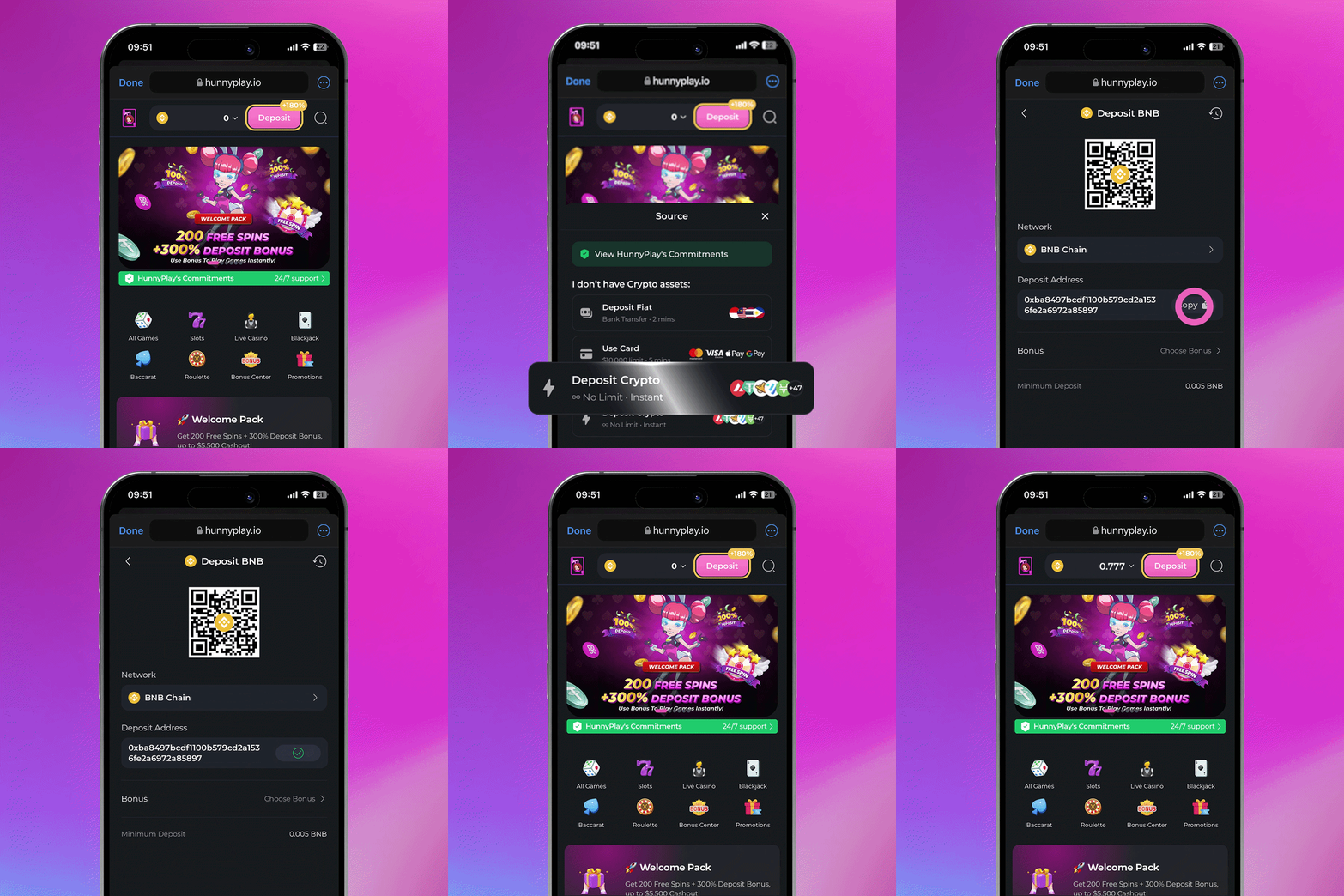
1️⃣ Click the “Deposit” button on the top taskbar and select the “Deposit Crypto” tab.
2️⃣ Choose the desired Coin and Network.
3️⃣ Copy the Deposit Address and paste it into your personal crypto wallet, along with the amount you wish to send.
*Note: Ensure the amount exceeds the minimum deposit requirement.
4️⃣ Once the transaction is confirmed, your updated balance will appear in your HunnyPlay account.
⭐ For users signed in with Wallet:
1️⃣ Click the “Deposit” button and navigate to the “Deposit Crypto” tab.
2️⃣ Select your Coin, Network, and the amount you wish to deposit (subject to your Wallet Balance).
3️⃣ If it is your first deposit, click “Approve”, followed by “Deposit”, and confirm the transaction in your wallet.
4️⃣ Upon successful processing, the balance will be reflected in your HunnyPlay account.
🏦 Deposit with Fiat (Bank Transfer)
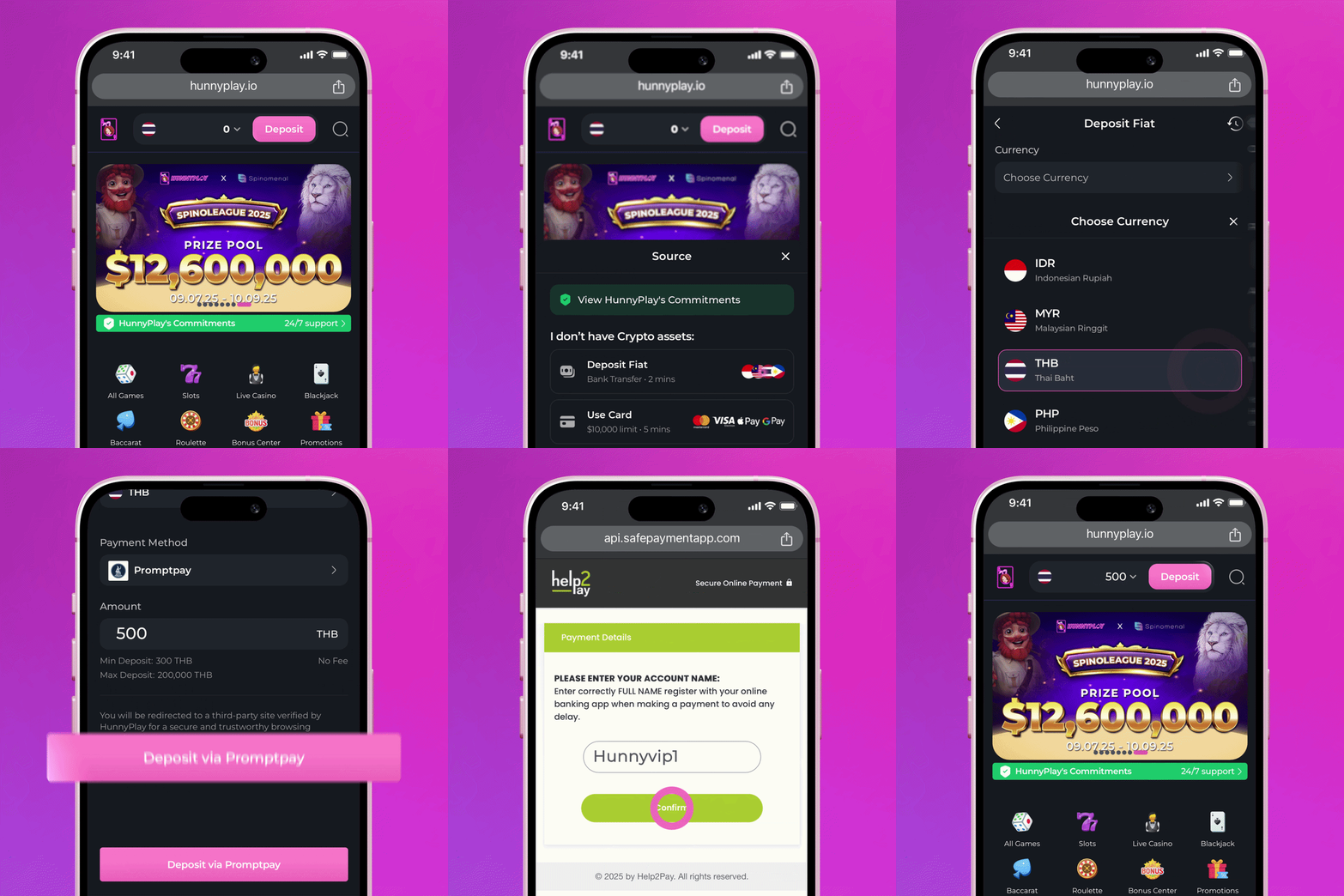
1️⃣ Click the “Deposit” button and choose the “Deposit Fiat” tab.
2️⃣ Select your desired Coin and Payment Method (like bank transfer).
3️⃣ Enter the deposit amount within the allowed range.
4️⃣ Click the button to “Deposit via your selected payment method”.
5️⃣ You’ll be redirected to a secure third-party site verified by HunnyPlay. Just follow the instructions to complete your deposit.
💳 Deposit with Credit Card
1️⃣ Click “Deposit” and choose the “Use Card” section.
2️⃣ Select a trusted provider - Moonpay, Paybis, or Chainbits - to buy crypto using your card.
3️⃣ Enter the amount and currency you want to buy (up to a $10,000 limit).
4️⃣ Once the crypto purchase is complete, return to the Deposit page and transfer your new crypto to your HunnyPlay account.
5️⃣ From there, just follow the Deposit with Crypto by Wallet steps to finalize.
If you require any further assistance, our support team is available 24/7 to help guide you through the process. Thank you for choosing HunnyPlay!